Which image format was best in this test?
There was no single winner. WebP produced the smallest photorealistic output, while AVIF was smallest for the UI screenshot, flat illustration, and transparent graphic. PNG was the only format that reproduced every normalized source pixel exactly. JPG discarded transparency but remained competitive for the photorealistic sample.
Complete benchmark results
Negative size change means the output is smaller than that source PNG. Positive change means it is larger. PSNR is calculated after decoding; “Lossless” means the compared pixel buffers were identical. For the transparent test, visual metrics use a white composite while alpha preservation is checked separately.
| Source / category | Format | Dimensions | File size | Change | Alpha | Setting | PSNR | 100% inspection |
|---|---|---|---|---|---|---|---|---|
| photorealistic-landscape.png Photorealistic scene | JPG | 1536x1024 | 391,819 B (382.6 KiB) | -88.31% | Not applicable | 80 (lossy) | 33.94 dB | Slight At 100%, fine foliage and stone edges showed slight softening and faint ringing; no obvious blocking in the inspected crop. |
| photorealistic-landscape.png Photorealistic scene | PNG | 1536x1024 | 3,000,718 B (2930.4 KiB) | -10.51% | Not applicable | Lossless; compression level 9 | Lossless | None observed The decoded 100% crop matched the normalized source pixels. |
| photorealistic-landscape.png Photorealistic scene | WebP | 1536x1024 | 342,480 B (334.5 KiB) | -89.79% | Not applicable | 80 (lossy), effort 6 | 35.24 dB | Slight At 100%, fine foliage and water texture were slightly smoothed; edges remained clear. |
| photorealistic-landscape.png Photorealistic scene | AVIF | 1536x1024 | 537,438 B (524.8 KiB) | -83.97% | Not applicable | 80 (lossy), effort 6 | 41.72 dB | Minimal The 100% crop stayed closest to the source among the lossy outputs; only very subtle texture smoothing was observed. |
| ui-screenshot.png Screenshot / UI | JPG | 1200x800 | 48,398 B (47.3 KiB) | -18.17% | Not applicable | 80 (lossy) | 41.87 dB | Slight Small text and one-pixel rules showed faint halos and chroma softening at 100%. |
| ui-screenshot.png Screenshot / UI | PNG | 1200x800 | 77,434 B (75.6 KiB) | +30.92% | Not applicable | Lossless; compression level 9 | Lossless | None observed Small text, fills, and rules matched the normalized source pixels. |
| ui-screenshot.png Screenshot / UI | WebP | 1200x800 | 21,234 B (20.7 KiB) | -64.10% | Not applicable | 80 (lossy), effort 6 | 43.77 dB | Slight Small text remained readable but was marginally softer than PNG at 100%. |
| ui-screenshot.png Screenshot / UI | AVIF | 1200x800 | 19,353 B (18.9 KiB) | -67.28% | Not applicable | 80 (lossy), effort 6 | 52.45 dB | Minimal Small text and rules remained crisp in the inspected 100% crop, with no obvious banding. |
| flat-illustration.png Illustration / flat graphic | JPG | 1200x800 | 28,406 B (27.7 KiB) | -13.28% | Not applicable | 80 (lossy) | 41.08 dB | Visible Hard diagonal edges showed faint ringing and color bleed at 100%. |
| flat-illustration.png Illustration / flat graphic | PNG | 1200x800 | 40,376 B (39.4 KiB) | +23.26% | Not applicable | Lossless; compression level 9 | Lossless | None observed Hard edges, flat fills, and gradients matched the normalized source pixels. |
| flat-illustration.png Illustration / flat graphic | WebP | 1200x800 | 12,652 B (12.4 KiB) | -61.38% | Not applicable | 80 (lossy), effort 6 | 42.36 dB | Slight Hard edges showed slight smoothing; flat fills remained visually stable. |
| flat-illustration.png Illustration / flat graphic | AVIF | 1200x800 | 10,029 B (9.8 KiB) | -69.38% | Not applicable | 80 (lossy), effort 6 | 52.05 dB | Minimal Edges and fills stayed close to the source; only subtle edge smoothing was observed. |
| transparent-shapes.png Transparent image | JPG | 1200x800 | 27,680 B (27.0 KiB) | -49.15% | No - flattened on white | 80 (lossy) | 42.77 dB | Visible Transparency was flattened on white as required by JPG; semitransparent overlaps cannot be recovered, and faint edge ringing was visible. |
| transparent-shapes.png Transparent image | PNG | 1200x800 | 61,830 B (60.4 KiB) | +13.58% | Yes | Lossless; compression level 9 | Lossless | None observed Alpha gradients and antialiased edges matched the normalized source pixels. |
| transparent-shapes.png Transparent image | WebP | 1200x800 | 29,038 B (28.4 KiB) | -46.66% | Yes | 80 (lossy), effort 6 | 47.81 dB | Slight Transparency was preserved, with slight color/gradient deviation visible in semitransparent overlaps at 100%. |
| transparent-shapes.png Transparent image | AVIF | 1200x800 | 18,644 B (18.2 KiB) | -65.75% | Yes | 80 (lossy), effort 6 | 56.98 dB | Minimal Transparency and soft edges were preserved; no obvious halo was visible in the inspected crop. |
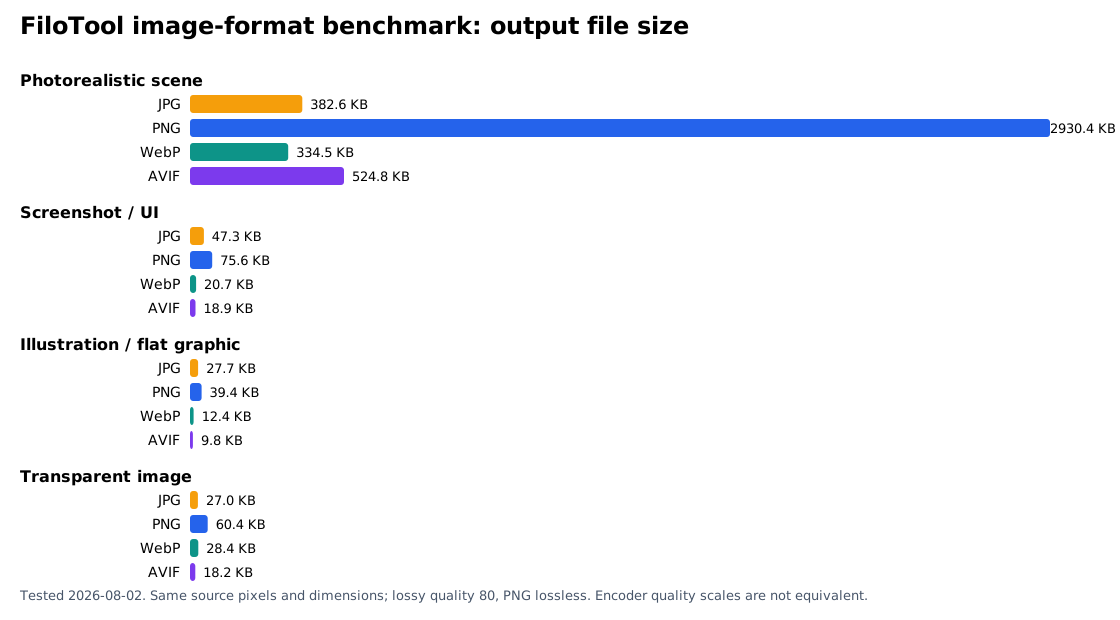
Methodology and test conditions
Test corpus
- Photorealistic scene: original AI-generated 1536×1024 PNG with foliage, water, stone, clouds, and gradients.
- UI screenshot: locally generated 1200×800 PNG with small text, rules, icons, and flat fills.
- Flat illustration: locally generated 1200×800 PNG with hard edges and gradients.
- Transparency: locally generated 1200×800 PNG with partial alpha, antialiasing, overlaps, and a soft shadow.
Encoder and settings
sharp 0.34.5; libvips 8.17.3 on win32 x64; Node v24.16.0. JPG used quality 80 and 4:2:0 chroma subsampling; WebP used quality 80, effort 6, and alpha quality 100; AVIF used quality 80, effort 6, and 4:4:4 chroma; PNG used lossless compression level 9 with adaptive filtering.
FiloTool’s public Image Converter uses browser canvas encoders where available. We used its supported format set and transparency behavior, but ran this fixed benchmark with Sharp/libvips so the encoder version and outputs are repeatable across one documented environment.
Measurements
Every output retained the source dimensions. Byte counts come from the written files. SHA-256 hashes identify each source in the CSV. PSNR and RMSE use decoded 8-bit RGBA pixels. Transparent outputs were composited on white for visual-pixel metrics, with alpha preservation tested independently.
Visual inspection
We viewed the normalized source and every output at 100% and compared small text, one-pixel rules, hard edges, gradients, foliage, water, stone detail, transparency, halos, ringing, smoothing, blocking, banding, and color shift. Labels are qualitative observations, not invented quality scores.
Source and output files are available under the public benchmark dataset paths linked in the CSV/JSON. The full local protocol is recorded in audit/image-format-benchmark-methodology.md.
When to use JPG, PNG, WebP, or AVIF
JPG / JPEG
Choose JPG for photographs when broad workflow compatibility or a simple fallback matters and transparency does not. In this test it was 391,819 bytes for the photorealistic scene—14% larger than WebP but 27% smaller than AVIF at the tested settings.
Use PNG to JPG when flattening transparency is acceptable, or JPG to PNG when a PNG container is required (without expecting lost JPG detail to return).
PNG
Choose PNG when exact decoded pixels or reliable alpha matter more than the smallest file. PNG was lossless in all four rows, but re-encoding already optimized small graphics sometimes increased size. It was much larger than lossy alternatives for the photorealistic scene.
WebP
WebP was the smallest photorealistic result in this corpus and preserved alpha in the transparency test. It is a practical modern-web candidate, but its quality 80 value is not equivalent to another encoder’s quality 80.
Try JPG to WebP and keep WebP to JPG available for workflows that require JPG.
AVIF
AVIF was smallest for three sources and had the highest PSNR among lossy outputs in every source category at these settings. It was not smallest for the photorealistic source. Encoding support can vary by browser/tool, so FiloTool reports when browser AVIF encoding is unavailable.
Use AVIF to JPG or AVIF to PNG when a receiving workflow cannot use AVIF.
Practical decision guide
| Need | Start with | Verify |
|---|---|---|
| Photograph on a modern website | WebP and AVIF test encodes | Compare actual bytes and 100% detail; keep JPG fallback if required. |
| Screenshot with small text | PNG for exactness; AVIF/WebP for tested delivery | Inspect text edges and one-pixel rules at 100%. |
| Logo or flat raster graphic | PNG for lossless raster; also consider SVG if the source is vector | Look for ringing and color bleed around hard edges. |
| Transparency | PNG, WebP, or AVIF | Test alpha edges on light and dark backgrounds. Do not use JPG unless flattening is intended. |
| Maximum receiving-app compatibility | JPG for photos, PNG for lossless/alpha | Test the actual CMS, email client, browser, editor, or upload service. |
For web work, resize oversized images first with the Image Resizer, compare formats in the Image Converter, then reduce the chosen output with the Image Compressor. Recheck visible quality after every lossy encode.
Limitations
- Four images cannot represent every photograph, screenshot, illustration, or alpha pattern.
- The photorealistic source is AI-generated and is not a camera capture; it is disclosed so the corpus is fully first-party and distributable.
- Nominal quality 80 is not matched perceptual quality across encoders.
- PNG optimization varies by encoder; the source PNG and output PNG can differ in bytes while decoding to identical pixels.
- PSNR/RMSE do not fully describe human perception. They supplement—not replace—the documented 100% inspection.
- Encoding speed, animation, HDR, metadata retention, color profiles, and live browser market-share percentages were not tested.
- Results can change with different source pixels, encoder versions, chroma settings, effort, quality, browser, or operating system.
Questions this benchmark can answer
Which format made the smallest files?
WebP was smallest for the photorealistic source. AVIF was smallest for the screenshot, flat illustration, and transparent source. That is a result for these files and settings, not a universal rule.
Which format preserved quality best?
PNG reproduced the normalized pixels exactly. Among lossy outputs, AVIF had the highest PSNR in all four categories at the tested settings, while 100% inspection found minimal artifacts. Quality settings were not perceptually matched.
Which format is best for transparency?
PNG, WebP, and AVIF all preserved transparency in the alpha test. PNG was lossless; AVIF was smallest; WebP fell between them. JPG cannot preserve alpha and was flattened on white.
Why did the PNG output become larger in some rows?
PNG is lossless, but different encoders and filtering choices can produce different byte counts for the same decoded pixels. Converting an already optimized PNG can make it larger without changing visible pixels.
Can I reproduce or cite the results?
Yes. Download the CSV or JSON, use the source hashes and settings, and identify this as the FiloTool image format comparison tested on 2026-08-02. Cite the limitations with the result you use.